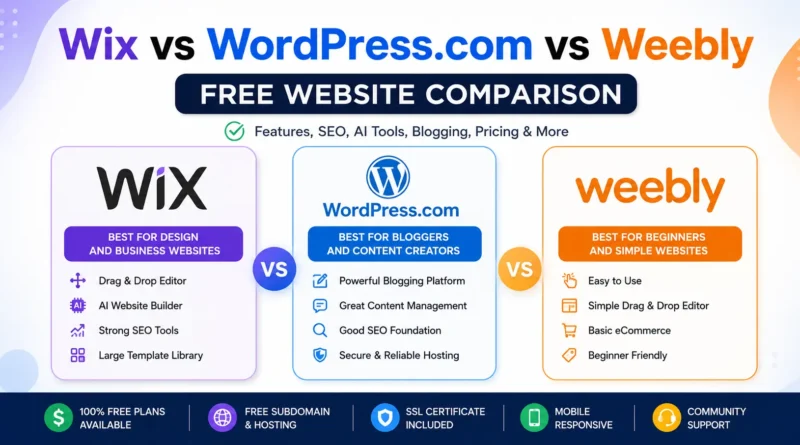
Wix vs WordPress.com vs Weebly: Free Website Comparison
Choosing the right free website builder can save you time, money, and frustration. Three of the most popular options are Wix, WordPress.com, and Weebly. Each platform offers free hosting, website templates, and beginner-friendly tools, but they differ significantly in flexibility, SEO capabilities, AI features, and long-term scalability.
This guide compares these three platforms from an audience-first perspective while also explaining how AI search, topical authority, and modern SEO should influence your decision.
Quick Comparison
| Feature | Wix | WordPress.com | Weebly |
|---|---|---|---|
| Free Plan | Yes | Yes | Yes |
| Drag-and-Drop Editor | Excellent | Limited | Good |
| AI Website Builder | Yes | Basic AI Writing | Basic |
| SEO Features | Very Good | Good | Average |
| Blogging | Good | Excellent | Basic |
| App Marketplace | Large | Limited | Small |
| Ecommerce | Paid Plans | Paid Plans | Basic |
| Learning Curve | Easy | Moderate | Very Easy |
| Best For | Small Businesses | Bloggers | Beginners |
Search Intent
Primary Intent: Commercial Investigation
Users searching this topic usually want to:
- Compare free website builders
- Find the easiest platform
- Understand SEO limitations
- Decide which builder fits their needs
- Know whether switching later is easy
This article answers every major question before recommending a platform.
What Is Wix?
Wix is an all-in-one website builder designed for users who want professional-looking websites without coding.
Key features include:
- Drag-and-drop editor
- Hundreds of templates
- AI website generator
- Built-in SEO tools
- Marketing integrations
- App Marketplace
- Booking systems
- Portfolio templates
Best suited for:
- Local businesses
- Personal brands
- Freelancers
- Restaurants
- Service businesses
What Is WordPress.com
WordPress.com is a hosted version of WordPress that allows users to Create Free Website Without Coding and managing servers.
It offers:
- Powerful blogging
- Secure hosting
- Automatic updates
- Built-in themes
- Community support
Unlike self-hosted WordPress.org, users have limited customization on the free plan.
Best for:
- Bloggers
- Writers
- News websites
- Educational content
- Content marketing
What Is Weebly?
Weebly focuses on simplicity.
It provides:
- Easy drag-and-drop editor
- Responsive themes
- Basic ecommerce
- Simple blogging
- Small business tools
Although development has slowed compared to competitors, it remains useful for very small websites.
Best for:
- School projects
- Personal websites
- Landing pages
- Beginners
Ease of Use
Wix
The easiest visual builder.
Pros:
- True drag-and-drop
- Visual editing
- Beginner friendly
- AI assistance
Rating: 9.8/10
WordPress.com
Slight learning curve.
Pros:
- Powerful editor
- Better content management
- Block editor
Rating: 8.5/10
Weebly
Very beginner friendly but fewer features.
Rating: 8.8/10
Design Flexibility
Winner: Wix
Reasons:
- 900+ templates
- Animation effects
- Mobile optimization
- Advanced layouts
- Visual customization
WordPress.com themes are attractive but more structured.
Weebly offers fewer modern design options.
SEO Comparison
Wix SEO
Strengths:
- Custom titles
- Meta descriptions
- Canonical URLs
- Image alt text
- Structured data support
- SEO Setup Checklist
WordPress.com SEO
Strengths:
- Excellent blogging
- Clean URLs
- Categories
- Tags
- Internal linking
Free plan limitations apply.
Weebly SEO
Provides:
- Titles
- Descriptions
- Alt text
Missing many advanced optimization features.
AI Features in 2026
Wix AI
Includes:
- AI Website Generator
- AI Text Generator
- AI Image Creator
- AI Layout Suggestions
Ideal for users who want faster website creation.
WordPress.com AI
Offers AI-assisted writing and content improvements, especially helpful for bloggers creating long-form articles.
Weebly
Minimal AI functionality compared to competitors.
Blogging Experience
Winner: WordPress.com
Reasons:
- Better editor
- Categories
- Tags
- Scheduling
- Archive pages
- Content organization
For publishing content regularly, WordPress.com provides the strongest blogging workflow.
Ecommerce Comparison
| Feature | Wix | WordPress.com | Weebly |
|---|---|---|---|
| Products | Paid | Paid | Basic |
| Payments | Paid | Paid | Paid |
| Inventory | Paid | Paid | Limited |
| Coupons | Paid | Paid | Basic |
Businesses planning to sell products should expect to upgrade from the free plans.
Performance
Wix
- Fast CDN
- Automatic optimization
- Reliable uptime
WordPress.com
- Excellent hosting
- Fast caching
- Strong infrastructure
Weebly
- Stable but fewer performance enhancements
Security
All three platforms include:
- SSL certificates
- Automatic updates
- Hosted infrastructure
- Basic DDoS protection
Users do not need to manage server security.
Customization
Wix
- Large App Market
- Marketing integrations
- CRM
- Booking systems
- Forms
WordPress.com
Customization depends on the chosen plan.
Higher-tier plans unlock plugins and advanced themes.
Weebly
Smaller extension ecosystem.
Pricing Flexibility
All three offer free plans, but paid upgrades remove ads, unlock custom domains, and provide additional storage and premium features.
Pros and Cons
Wix
Pros
- Best design tools
- Excellent AI
- Great templates
- Strong SEO
- Easy to use
Cons
- Free plan includes ads
- Limited template switching after publishing
WordPress.com
Pros
- Best blogging platform
- Strong content organization
- Reliable hosting
Cons
- Limited customization on free plan
- Plugins require higher-tier plans
Weebly
Pros
- Very easy
- Simple interface
- Good for beginners
Cons
- Smaller ecosystem
- Slower innovation
- Fewer advanced features
Which Platform Is Best?
Choose Wix if you want:
- Beautiful business website
- Portfolio
- AI website builder
- Marketing features
Choose WordPress.com if you want:
- Blogging
- Content marketing
- News website
- Publishing platform
Choose Weebly if you want:
- School projects
- Personal pages
- Simple websites
- Fast setup
Content Cluster Strategy
To build topical authority around website builders, create supporting articles that link back to this comparison page.
Pillar Page
- Wix vs WordPress.com vs Weebly
Supporting Cluster Content
Beginner Guides
- How to Build a Free Website
- Best Website Builders for Beginners
- Website Builder vs CMS
- Website Builder vs Coding
Platform-Specific Guides
- Wix SEO Guide
- WordPress.com SEO Tips
- Weebly Website Tutorial
- Wix AI Review
- WordPress.com Features Explained
Comparison Articles
- Wix vs Squarespace
- Wix vs Shopify
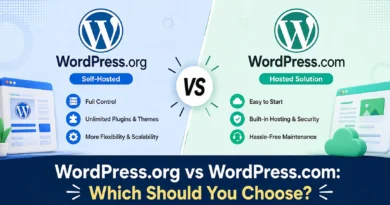
- WordPress.com vs WordPress.org
- Wix vs Google Sites
- Weebly vs Google Sites
- Best Free Website Builders
Technical Guides
- Free Domain vs Custom Domain
- Website Hosting Explained
- SSL Certificates for Beginners
- Responsive Web Design Guide
FAQs
Is Wix better than WordPress.com?
For beginners and visual design, Wix is generally easier. For blogging and content publishing, WordPress.com has the advantage.
Which platform is best for SEO?
Wix and WordPress.com both provide solid SEO capabilities on their free plans, though advanced features may require paid upgrades.
Is Weebly still worth using?
Yes, if you need a simple personal or educational website. However, it offers fewer modern features than Wix or WordPress.com.
Can I switch platforms later?
Yes, but migration may require manual work, especially for design elements and certain content types.
Which platform is easiest for beginners?
Wix is often the easiest because of its intuitive drag-and-drop editor and AI-assisted setup.
Final Verdict
Wix, WordPress.com, and Weebly each serve different audiences.
- Choose Wix for design flexibility, AI-powered tools, and business websites.
- Choose WordPress.com if publishing content and blogging are your top priorities.
- Choose Weebly if you want a straightforward, no-frills website builder.
Instead of focusing only on features, think about your long-term goals. If you plan to grow your content, build topical authority, and attract organic traffic, select the platform that supports your future SEO strategy—not just your immediate website needs.