
Google Word Coach: How to Play and Improve Your Vocabulary
Google Word Coach is a free vocabulary quiz that runs inside Google Search. You search for “word coach” on your phone, answer short questions about word meanings, and get instant feedback on each answer. There is no app to install and no account to create, so you can practice English words for a few minutes whenever you have time.
Below you will find how to open it, how to play, what the questions look like, how to get real value from it, and what to do when it does not show up.
What Is Google Word Coach?
Google Word Coach is a search feature, not a standalone app. When you trigger it, a quiz box appears on the results page. It asks a question, usually gives you two answer choices, and tells you right away whether you were correct.
The questions test:
- Word meanings: what a word means
- Synonyms: words with a similar meaning
- Antonyms: words with the opposite meaning
- Word usage: which word fits a sentence
- Picture matching: choosing the image that fits a word
If you answer wrong, you see the correct answer, so every mistake teaches you something. Each correct answer adds to your score.
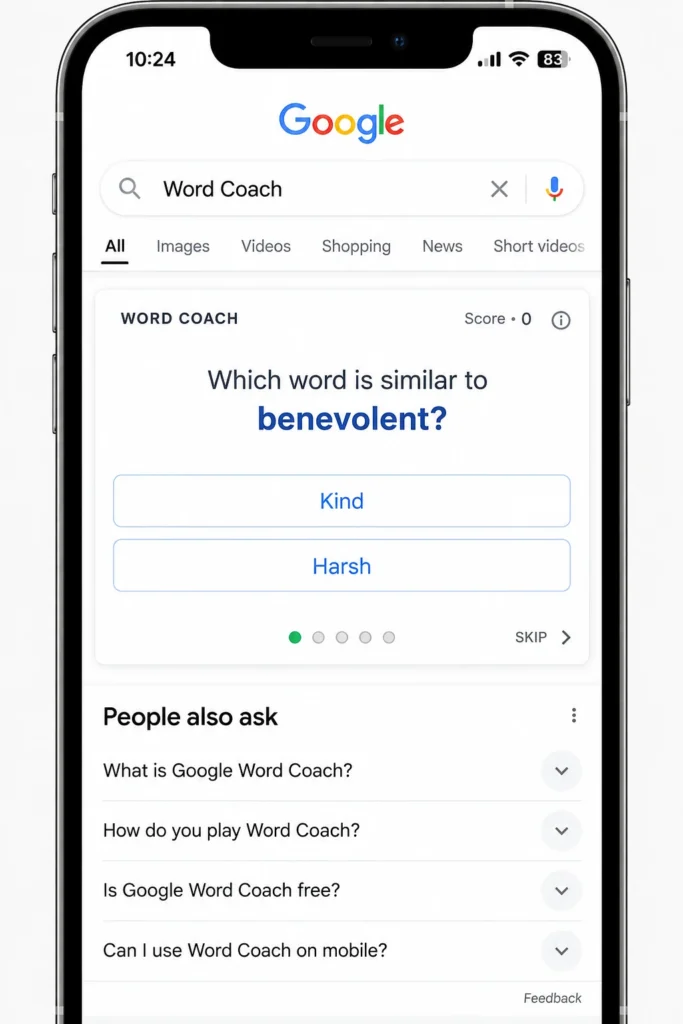
How to Open Google Word Coach
Word Coach shows up most reliably on mobile. Here is how access differs by device.
| Device | How to open it | How reliable |
|---|---|---|
| Android phone | Open the Google app or Chrome and search “word coach” | High |
| iPhone | Open the Google app or Safari and search “word coach” | High |
| Desktop browser | Search “word coach” or “vocabulary quiz” | Inconsistent, may not appear |
Availability can change with your country, language and account settings. If the quiz does not appear on desktop, switch to your phone. Searching the meaning of a simple word, such as “meaning of happy”, can also bring up the quiz box below the definition.
How to Play Google Word Coach Step by Step
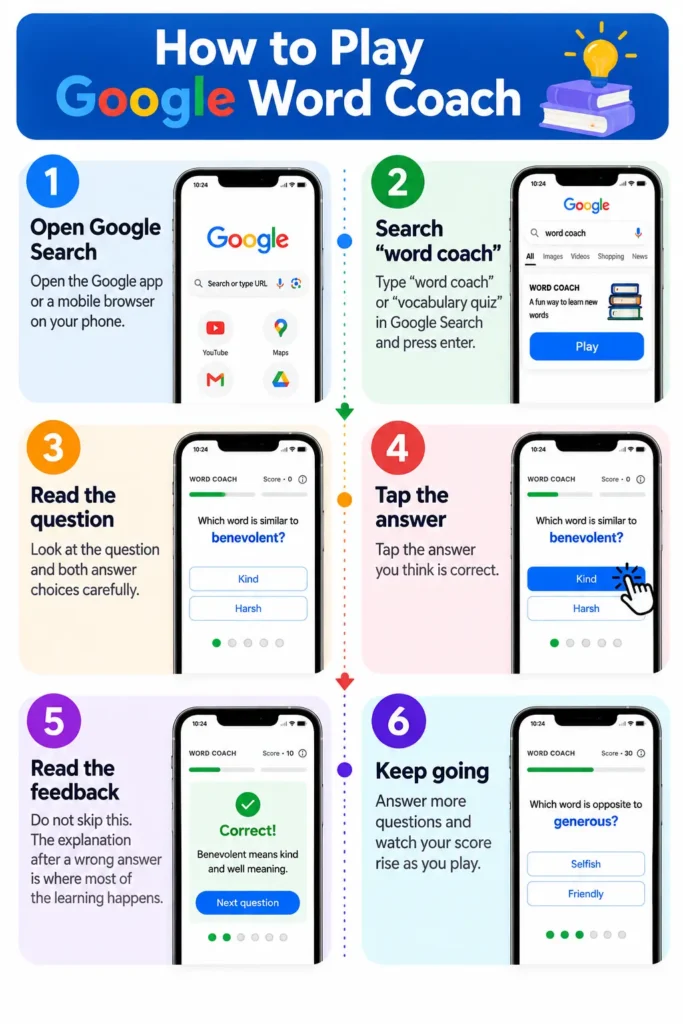
- Open Google Search in the Google app or a mobile browser.
- Search “word coach” or “vocabulary quiz”.
- Read the question and look at both answer choices.
- Tap the answer you think is correct.
- Read the feedback. Do not skip this. The explanation after a wrong answer is where most of the learning happens.
- Keep going and watch your score rise as you answer more questions correctly.
In practice, the biggest mistake new players make is tapping fast to raise the score. A slower pace with careful reading teaches more than a fast one.
What Does a Word Coach Question Look Like?
Here are three sample questions in the style the game uses:
- Synonym: Which word means the same as “fast”? Quick or heavy. The answer is quick.
- Antonym: What is the opposite of “happy”? Sad or big. The answer is sad.
- Picture: Which picture shows a dog? You pick between two images.
The questions look easy, but difficulty rises as you progress, and you will meet less common words.
Does Google Word Coach Actually Improve Vocabulary?
It can, if you use it the right way. Two well known ideas from learning research explain why short quizzes work.
- The testing effect. Researchers Henry Roediger and Jeffrey Karpicke published a study in 2006 showing that taking a test on material helps people remember it longer than simply rereading it. Every Word Coach question is a small test.
- The forgetting curve. Hermann Ebbinghaus described in 1885 how memory of new information fades quickly unless you revisit it. Playing daily, in short sessions, brings words back before you forget them.
Here is a simple calculation to set expectations. This is an illustration, not a measured result. Suppose you play 10 minutes a day and add 3 new words that you can use correctly the next day. After 30 days you have 90 words. After 90 days you have 270 words. That is a real gain for 10 minutes a day, and it only works if you actually use the words afterward.
Word Coach does have limits. It teaches recognition, meaning you can pick the right answer from two options. It does not train you to produce the word in your own writing or speech. That part is up to you.
Google Word Coach vs Other Ways to Learn Words
| Method | Cost | Setup | Best for | Weak point |
|---|---|---|---|---|
| Google Word Coach | Free | None, runs in Search | Quick daily practice | Recognition only, no writing practice |
| Flashcard apps | Free or paid | Install and build decks | Custom word lists | Takes time to build and maintain |
| Reading books and articles | Free or paid | None | Learning words in context | Slow, and you may not look up new words |
| Writing practice | Free | None | Using words actively | No instant feedback on word choice |
The best result comes from combining Word Coach with reading and writing, not from using one method alone.
A 10 Minute Daily Routine That Works
Use this routine to turn quiz points into words you can actually use.
| Minutes | What to do |
|---|---|
| 0 to 5 | Play Word Coach and read every explanation |
| 5 to 7 | Write down the 3 words you got wrong or did not know |
| 7 to 10 | Write one sentence for each word in your own life |
Keep your word list in one place and sort your word list alphabetically with an alphabetizer so older words are easy to find and review. If you want to check how many syllables a new word has, a syllable counter helps you hear its rhythm before you say it aloud.
Once a week, write a short paragraph of five sentences that uses at least five of your new words. Run it through a paragraph counter to confirm it stays short and focused. When you practice sentence writing, a sentence counter shows how many sentences you wrote in a session, which makes progress easy to track.
Google Word Coach Not Showing Up? Try These Fixes
| Problem | Likely cause | Fix |
|---|---|---|
| Quiz box does not appear | Desktop browsers show it less often | Search on your phone in the Google app or Chrome |
| Quiz does not load | Cache or a weak connection | Clear the browser cache, refresh, and check your internet |
| Quiz appears in another language | Language setting is not English | Set Google language to English in Settings, then search again |
| Quiz still missing | Not available in your region or account | Try a different search such as “vocabulary quiz” or “meaning of happy” |
Is There a Google Word Coach Leaderboard?
No. Google does not publish an official leaderboard, so there is no way to confirm who holds the highest score. Lists you find online are made by fans and are based on screenshots that users post themselves. Scores in the millions appear on those lists. Treat them as unverified and focus on your own progress instead.
Who Should Use Google Word Coach?
- Students preparing for exams such as SSC, UPSC, IELTS, TOEFL and GRE who need steady daily word practice
- Job seekers who want clearer English for interviews
- Office workers who write emails and reports and want better word choice
- Beginners and casual learners who find books and dictionaries boring
- School children who learn better through short game style questions
Google Word Coach Related FAQs:
Is Google Word Coach free?
Yes. It is a free feature inside Google Search. You do not need to pay or create a separate account.
How do I play Google Word Coach on my phone?
Open the Google app or Chrome, search “word coach”, and tap the answer you think is correct. Google shows the right answer after each question so you can learn from mistakes.
Why is Google Word Coach not working or not showing?
It usually appears more often on mobile than on desktop, and it depends on your region and language settings. Try the Google app, clear your cache, and set your language to English.
Is there a Google Word Coach app?
No. There is no separate app in the Play Store or App Store. You play it directly inside Google Search.
Can I play Google Word Coach offline?
No. It runs inside Google Search, so you need an internet connection to load questions and see results.
Does Google Word Coach have an official leaderboard?
No. Google does not publish one, and high scores seen online are unofficial and user reported.
