
Technical SEO: Complete Guide to Optimization & Best Practices
Technical SEO is the practice of improving a website’s infrastructure so search engines can crawl, render, index, and rank its pages without obstacles. It covers crawlability, indexability, site speed, mobile usability, security, structured data, and site architecture. Strong content and links only perform when these foundations are in place.
This guide explains each part of technical SEO, shows how to fix the most common problems, and ends with a repeatable audit process.
What Is Technical SEO and Why It Matters
Technical SEO focuses on how a site is built and served, not on what the content says. A page with excellent writing still fails if Googlebot cannot reach it, if a stray noindex tag removes it from results, or if it takes six seconds to load on a phone.
Technical SEO vs On Page SEO vs Off Page SEO
| Type | Main focus | Examples | Who usually handles it |
|---|---|---|---|
| Technical SEO | Site infrastructure | Crawling, indexing, speed, schema, redirects | Developer, SEO specialist |
| On page SEO | Page content and markup | Titles, headings, keyword use, internal links | Writer, SEO specialist |
| Off page SEO | Signals from other sites | Backlinks, brand mentions, digital PR | SEO, outreach, PR team |
Why Technical SEO Matters
Search engines work in stages: crawling, rendering, indexing, and ranking. A fault at any early stage blocks everything after it. A page that is not indexed cannot rank, whatever its quality.
In practice, technical faults are often the cause when several pages lose impressions in the same week. On a WordPress tools site I manage, four pages lost impressions together. Because they shared one page template, the first checks were robots.txt, the sitemap, and noindex tags, not the content on each page. Shared causes should be ruled out before pages are rewritten one at a time.
How Search Engines Process a Page
- Discovery: Googlebot finds a URL through links, sitemaps, or previous crawls.
- Crawling: The bot requests the URL and downloads the HTML.
- Rendering: Google runs the JavaScript and builds the final page.
- Indexing: Google decides whether to store the page and under which canonical URL.
- Ranking: Indexed pages are scored against queries.
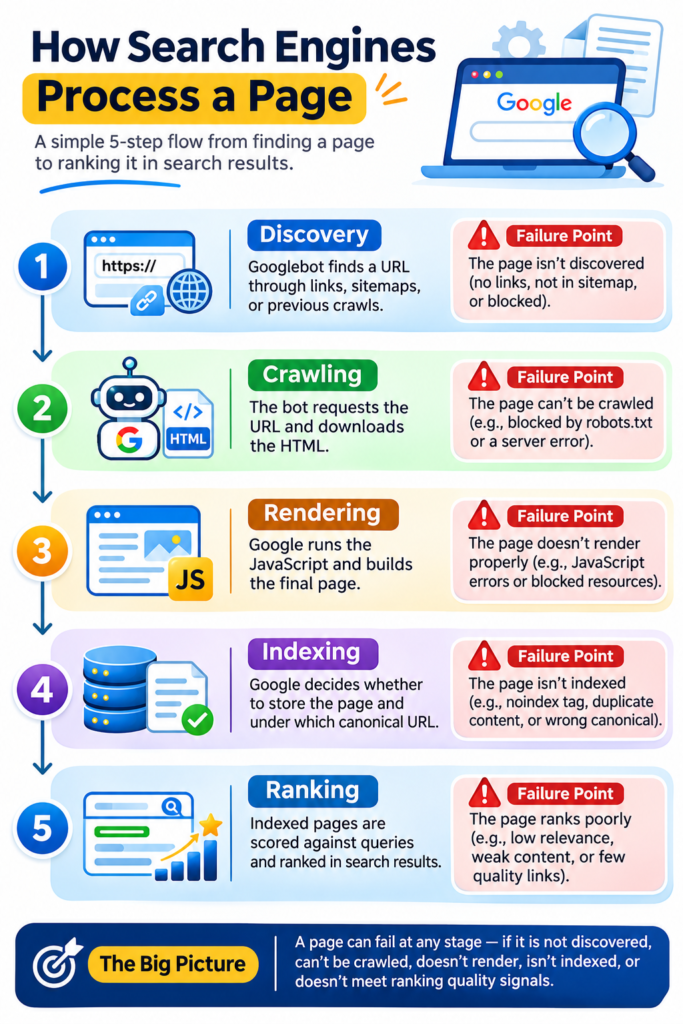
Technical SEO removes friction at steps 1 to 4.
Crawlability: Helping Search Engines Find Pages
Crawlability is how easily a bot can reach and read the pages on a site.
Robots.txt
The robots.txt file sits at the root of a domain and tells bots which paths they may request. Key points:
Disallowblocks crawling, not indexing. A blocked URL can still appear in results if other sites link to it.- Google stopped supporting
noindexinside robots.txt on 1 September 2019. - CSS and JavaScript files should stay crawlable, otherwise Google cannot render pages properly.
- The sitemap location should be declared with a
Sitemap:line.
A safe basic file for a WordPress site looks like this:
User-agent: *
Disallow: /wp-admin/
Allow: /wp-admin/admin-ajax.php
Sitemap: https://example.com/sitemap_index.xml
XML Sitemaps
An XML sitemap lists the URLs a site wants indexed. Google’s limit is 50,000 URLs or 50 MB uncompressed per file, so larger sites use a sitemap index that points to several files.
Best practices:
- Include only canonical, indexable URLs that return a 200 status.
- Remove redirected, noindexed, and 404 URLs.
- Keep the
lastmoddate accurate. Google has said it uses this value only when it proves reliable. - Submit the sitemap in Google Search Console and check the Sitemaps report for errors.
A quick way to validate the file is a sitemap checker, which confirms that the XML parses and that listed URLs respond correctly.
Crawl Budget
Crawl budget is the number of URLs Googlebot will crawl on a site in a given period. According to Google’s documentation, it matters mainly for sites with more than 1 million unique pages, or more than 10,000 pages that change daily. Smaller sites rarely run out of budget, but wasted crawling still slows the discovery of new pages.
Example calculation (illustrative figures): A shop has 20,000 indexable product URLs. Filter parameters create another 6,000 near duplicate URLs. That is 6,000 of 26,000 URLs, or about 23% of crawl activity spent on pages that add nothing. If Googlebot requests 4,000 URLs a day, roughly 920 of those requests are wasted. Blocking or canonicalizing the parameter URLs returns that capacity to real products.
Common crawl budget drains:
- Faceted navigation and filter parameters
- Session IDs in URLs
- Infinite calendar or search result pages
- Long redirect chains
- Soft 404 pages
Site Architecture and Internal Linking
Site architecture is how pages connect. A flat structure keeps important pages within three clicks of the homepage. Pages with no internal links are called orphan pages and are often missed by crawlers.
Site structure works best when it follows keyword research, with each important topic mapped to one page so that pages do not compete for the same query.
Good internal linking follows a few rules:
- Use descriptive anchor text that matches the target page’s topic.
- Link from high-authority pages to pages that need a boost.
- Add breadcrumbs to show hierarchy.
- Audit anchors regularly with an anchor text checker to catch generic labels such as “click here.”
To audit links at scale, an internal and external link extractor lists every link on a page, which makes orphan pages and broken targets easy to spot.
Indexability: Getting Pages Into the Index
Indexability is whether a crawled page is allowed and able to enter Google’s index.
Meta Robots and X-Robots-Tag
The meta robots tag controls indexing at page level. The X-Robots-Tag HTTP header does the same for non HTML files such as PDFs.
| Directive | Effect | Typical use |
|---|---|---|
index, follow | Default. Page can be indexed and links followed | Normal pages |
noindex | Page is excluded from the index | Thank you pages, internal search results |
nofollow | Links on the page are not followed | Untrusted user generated links |
noindex, follow | Page is excluded, links still followed | Thin utility pages |
A page must be crawlable for Google to see its noindex tag. Blocking a noindexed URL in robots.txt keeps the tag hidden, and the URL may stay indexed.
Canonical Tags
A canonical tag tells Google which URL is the preferred version when several URLs show the same or very similar content.
- Use self referencing canonicals on every indexable page.
- Canonicals are hints, not commands. Google may choose another URL.
- Never point a canonical to a redirected, noindexed, or 404 page.
- Keep the signals consistent. A canonical, sitemap entry, and internal links should all agree on one URL.
HTTP Status Codes and Redirects
| Status code | Meaning | SEO action |
|---|---|---|
| 200 | OK | Standard for indexable pages |
| 301 | Permanent redirect | Use for permanent URL changes |
| 302 | Temporary redirect | Use only for short term moves |
| 404 | Not found | Acceptable for removed pages with no replacement |
| 410 | Gone | Signals permanent removal, can speed deindexing |
| 500 / 503 | Server error | Fix quickly. Prolonged errors reduce crawling |
Redirect rules worth following:
- Redirect to the final destination in a single hop.
- Fix redirect chains. Googlebot follows up to 10 hops, but every hop wastes time and can lose signals.
- Avoid redirect loops.
- Update internal links to point straight at the final URL.
Duplicate Content, Pagination, and Parameters
Duplicate content rarely triggers a penalty, but it splits ranking signals and wastes crawl capacity. Typical sources:
- HTTP and HTTPS versions, or www and non www versions
- Trailing slash and non trailing slash versions
- Tracking parameters such as
?utm_source= - Printer friendly versions and tag archives
Fixes include 301 redirects for host and protocol variants, canonical tags for parameter pages, and consistent internal linking. Google no longer uses rel="next" and rel="prev" for pagination, so each paginated page should be indexable and link to its neighbors with plain links.
Site Speed and Core Web Vitals
Core Web Vitals are Google’s measures of real user experience. Google assesses them at the 75th percentile of page loads, using field data from the Chrome User Experience Report.
Core Web Vitals Thresholds
| Metric | Measures | Good | Needs improvement | Poor |
|---|---|---|---|---|
| LCP (Largest Contentful Paint) | Loading speed | 2.5 s or less | 2.5 to 4 s | Over 4 s |
| INP (Interaction to Next Paint) | Responsiveness | 200 ms or less | 200 to 500 ms | Over 500 ms |
| CLS (Cumulative Layout Shift) | Visual stability | 0.1 or less | 0.1 to 0.25 | Over 0.25 |
INP replaced First Input Delay as a Core Web Vital in March 2024.
How to Improve LCP, INP, and CLS
- For LCP: compress and resize the hero image, serve WebP or AVIF, preload the LCP image, and use a CDN with full page caching.
- For INP: break up long JavaScript tasks, remove unused plugins and scripts, and defer third party tags.
- For CLS: set width and height attributes on images and embeds, reserve space for ads, and avoid inserting banners above existing content.
Lab Data vs Field Data
Lab tools such as Lighthouse help with debugging, but field data in Search Console decides how Google sees the site. The two often differ, so both should be checked.
Mobile Usability, Security, and URL Structure
These three areas are quick to audit and often overlooked.
Mobile First Indexing
Google uses mobile first indexing, which means the mobile version of a page is the one crawled and indexed. Since July 2024, Google crawls all sites with its smartphone bot.
Checklist:
- Use a responsive design with the viewport meta tag.
- Keep content, structured data, and meta tags identical on mobile and desktop.
- Make tap targets large enough and spaced apart.
- Avoid intrusive interstitials that cover the main content.
- Keep text readable without zooming.
HTTPS and Security
HTTPS is a lightweight ranking signal, and browsers label HTTP pages as “Not secure.” Requirements:
- A valid SSL/TLS certificate with automatic renewal
- Site wide 301 redirects from HTTP to HTTPS
- No mixed content, meaning HTTP images or scripts on HTTPS pages
- An HSTS header once the setup is stable
- Regular malware and plugin vulnerability checks
Clean URL Structure
Clean URLs help users and crawlers understand a page before opening it.
- Keep URLs short, lowercase, and readable.
- Separate words with hyphens, not underscores.
- Avoid dates, session IDs, and unnecessary parameters.
- Do not change URLs without a 301 redirect plan.
Special characters in URLs must be encoded correctly. A URL encoder and decoder helps verify that spaces and symbols appear as intended in links and canonical tags.
Advanced Technical SEO: Schema, JavaScript, and International Targeting
Structured Data and Schema Markup
Structured data is code that labels page content for search engines. Google recommends the JSON-LD format, using the vocabulary from Schema.org.
Common types and their use:
- Article: news and blog content
- Product and Offer: price, availability, and review data
- Organization and WebSite: brand details and sitelinks search
- BreadcrumbList: navigation trail in results
- LocalBusiness: address and opening hours
Notes from practice:
- Markup must match visible content. Marking up hidden text risks a manual action.
- Google restricted FAQ rich results in August 2023, so they now appear mainly for well known government and health sites. FAQ markup is still harmless, but should not be expected to produce a visual result.
- Validate every template with Google’s Rich Results Test before release.

JavaScript SEO
Google can render JavaScript, but rendering happens in a second wave and can be delayed. Content that depends entirely on client side scripts may be indexed late or incompletely.
| Rendering method | How it works | SEO risk |
|---|---|---|
| Server side rendering (SSR) | HTML is built on the server per request | Low |
| Static generation | HTML is built ahead of time | Low |
| Client side rendering (CSR) | Browser builds the page from JavaScript | Higher, depends on render queue |
| Dynamic rendering | Bots get a prerendered version | Google treats it as a workaround, not a long term solution |
Rules of thumb: put critical content, links, and meta tags in the initial HTML, use real <a href> links instead of click handlers, and test with the URL Inspection tool’s rendered HTML view.
International SEO and Hreflang
Sites serving several languages or regions use hreflang annotations to show which version suits which audience.
- Every language version must reference all others, including itself.
- Return tags are mandatory. If page A points to page B, page B must point back to A.
- Use correct ISO codes, such as
en-gborhi-in. - Add an
x-defaulttag for the fallback page. - Keep hreflang URLs identical to canonical URLs.
Technical SEO Audit Process
Step by Step Audit Checklist
- Crawl the site. Run a full crawl and export status codes, titles, canonicals, and directives.
- Check indexing. Open the Page indexing report in Search Console and review the “Not indexed” reasons, such as “Crawled, currently not indexed” or “Duplicate without user selected canonical.”
- Review robots.txt and sitemaps. Confirm that nothing important is blocked and that the sitemap lists only valid, indexable URLs.
- Fix status code issues. Resolve 404s that have inbound links, remove redirect chains, and repair 5xx errors.
- Test Core Web Vitals. Check field data in Search Console, then diagnose problem templates with PageSpeed Insights.
- Verify mobile rendering. Inspect key URLs and confirm that content matches the desktop version.
- Validate structured data. Test each template and fix errors and warnings.
- Audit internal links. Find orphan pages, broken links, and weak anchor text.
- Check security. Confirm HTTPS, mixed content, and redirects.
- Prioritize and monitor. Rank fixes by impact and effort, then recrawl after each release and watch the Crawl Stats report.
Technical SEO Tools Compared
| Tool | Best for | Cost |
|---|---|---|
| Google Search Console | Indexing, Core Web Vitals, crawl stats, manual actions | Free |
| Screaming Frog SEO Spider | Full site crawls, redirect and canonical audits | Free up to 500 URLs, paid beyond |
| PageSpeed Insights / Lighthouse | Page speed and Core Web Vitals diagnosis | Free |
| Rich Results Test | Structured data validation | Free |
| Ahrefs / Semrush Site Audit | Scheduled audits and issue tracking | Paid |
Common Technical SEO Mistakes
- Leaving a staging site’s
noindexorDisallow: /in place after launch - Blocking CSS and JavaScript in robots.txt
- Listing redirected or noindexed URLs in the sitemap
- Pointing canonicals at the wrong URL
- Migrating a site without a redirect map
- Loading heavy plugins and scripts on every page
- Ignoring Search Console warnings until traffic drops
Related Reading:
Technical SEO FAQ
What is technical SEO in simple words?
Technical SEO is the work that helps search engines access, understand, and store a website’s pages. It includes site speed, mobile friendliness, secure connections, clean URLs, and correct indexing settings.
What are the main elements of technical SEO?
The main elements are crawlability, indexability, site speed and Core Web Vitals, mobile usability, HTTPS, site architecture, structured data, and canonicalization. Each one affects whether a page can be found and ranked.
How often should a technical SEO audit be done?
A full audit works well every 6 months for most sites, and monthly checks of Search Console reports catch problems earlier. Large or fast changing sites, such as online stores, benefit from continuous monitoring.
Does technical SEO affect rankings directly?
Some factors do, such as page experience signals and HTTPS. Most technical SEO work is indirect: it makes sure pages are crawled and indexed so that content and links can earn rankings.
What is the difference between crawling and indexing?
Crawling is when a search engine bot requests and reads a page. Indexing is when the search engine stores that page and makes it eligible to appear in results. A page can be crawled and still not be indexed.
Is technical SEO difficult for beginners?
The basics are manageable with Search Console and a crawler. Advanced areas such as JavaScript rendering, log file analysis, and large scale migrations usually need developer support.
Sources referenced: Google Search Central documentation (crawl budget, robots.txt, sitemaps, mobile first indexing, structured data), web.dev Core Web Vitals thresholds, Chrome User Experience Report, and Schema.org.