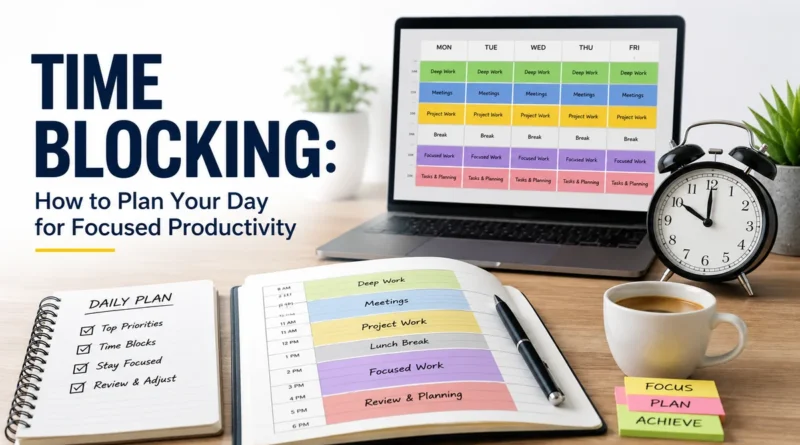
Time Blocking: How to Plan Your Day for Focused Productivity
Most people start their day with a to-do list and no real plan. They jump from task to task, check their phone every few minutes, and reach evening wondering where the day went. If this sounds familiar, time blocking can fix it.
Time blocking is a simple but powerful way to take control of your day. Instead of letting tasks control you, you decide in advance what you will do and when. This article explains what time blocking is, how it works, and how you can start using it today, even if your job feels unpredictable.
What Is Time Blocking?
Time blocking is a time management method where you divide your day into fixed blocks of time, and each block is assigned to one task or one group of related tasks. Instead of working from an open to-do list and deciding what to do next in the moment, you plan your entire day on a calendar ahead of time.
For example, your day might look like this:
- 9:00 to 10:00 AM: Reply to emails
- 10:00 AM to 12:00 PM: Work on the main project
- 12:00 to 1:00 PM: Lunch break
- 1:00 to 3:00 PM: Meetings
- 3:00 to 4:30 PM: Content writing
Each block has a clear start time, end time, and purpose. You are not guessing what to do next. You already know.
The idea is old. Benjamin Franklin used a version of it in the 1700s, planning his hours around work and reflection. In modern times, computer science professor Cal Newport, author of the book Deep Work, made time blocking popular again. He argues that a structured 40-hour week can produce more real output than a chaotic 60-hour week, simply because focused time gets more done than scattered time.
How Time Blocking Works
Time blocking rests on two simple ideas.
Visual scheduling means you put your tasks directly on a calendar, not just on a list. When something has a fixed place on your calendar, it is much harder to skip or forget.
Task grouping means you combine similar tasks into one block instead of scattering them across the day. Checking email five times a day breaks your focus five times. Checking email once, in one dedicated block, protects the rest of your day.
Here is a simple step-by-step process to build your own time-blocked schedule:
- List your tasks. Write down everything you need to do this week. If you are new to planning, track your work for a few days first so you know what actually takes up your time.
- Prioritize your tasks. Not everything matters equally. Decide what is urgent, what is important, and what can wait.
- Assign time blocks. Match each task or group of tasks to a specific window on your calendar. Put your hardest work where you have the most energy.
- Add buffer time. Leave gaps between blocks for delays, interruptions, or tasks that run long.
- Review and adjust. At the end of each day, check what worked and what did not, then update tomorrow’s blocks.
This is not a one-time exercise. Your schedule should change as your workload changes.
Time Blocking vs Timeboxing vs Task Batching
People often confuse time blocking, timeboxing, and task batching. They are related but not the same. The table below makes the difference clear.
| Method | What It Means | Example |
|---|---|---|
| Time Blocking | Assigning a fixed block of time to a task or group of tasks | “I will work on the report from 10 AM to 12 PM.” |
| Timeboxing | Setting a strict time limit for one task, whether it is finished or not | “I have one hour to draft the report. When time is up, I stop.” |
| Task Batching | Grouping small, similar tasks together to reduce switching between different types of work | “I will answer all emails and messages between 3 and 3:30 PM.” |
| Day Theming | Giving each day of the week its own focus or category of work | “Monday is for meetings, Tuesday is for writing, Wednesday is for research.” |
Task batching is really a building block inside time blocking. You batch similar tasks together first, then you place that batch on your calendar as a time block. Day theming takes this one step further by applying the same idea to entire days instead of just hours.
Why Time Blocking Works
Time blocking is effective because it directly reduces the biggest killer of productivity: context switching. Every time your brain jumps from one type of task to another, it takes time to refocus. Studies on attention residue show that part of your mind stays stuck on the previous task even after you move on. Time blocking limits how often this switching happens.
Here are the core benefits:
- Less context switching. You stop bouncing between emails, calls, and deep work, so your focus stays intact.
- Protected deep work time. You reserve blocks where nothing interrupts your most important project.
- Clear visibility. You can see exactly where your hours go, which makes it easier to spot wasted time.
- Lower risk of burnout. Rest, meals, and personal time get their own blocks instead of being squeezed out.
- Better follow-through on goals. Research on planning and behavior shows that people are far more likely to complete a task when they write down a specific time and place for it, compared to just having a general intention.
There is also a psychological principle at work here, known as Parkinson’s Law: work expands to fill the time available for it. If you give yourself an entire day for one task, it will likely take the entire day, even if it could have been done in two hours. Time blocking fights this by putting a real boundary around each task.
Who Should Use Time Blocking
Time blocking is not for everyone, and it does not fit every kind of job. It works best when you have stretches of open time that you control. If your day is packed wall-to-wall with meetings you cannot move, this method will feel forced.
You should try time blocking if you:
- Often multitask and feel like nothing gets fully finished
- Struggle to focus on one task without distraction
- Want a clear picture of where your time actually goes
- Feel like your day controls you instead of the other way around
- Tend to overwork because your day has no natural stopping point
Even people with reactive jobs, like customer support or account management, can benefit. You simply block time for “reactive work” instead of pretending it does not exist. This way, even unpredictable jobs get some structure.
Time Blocking Methods to Try
You do not have to follow one rigid style. Here are three popular variations you can mix and match.
Day theming assigns one theme to each day of the week. For example, Monday could be for planning and meetings, Tuesday for writing, and Wednesday for research. This reduces decision fatigue because you always know the general focus of the day.
Task batching groups small, similar tasks like emails, phone calls, or invoicing into one block instead of doing them throughout the day. This is one of the easiest ways to start time blocking because it needs very little planning.
Energy-based blocking matches your hardest tasks to your highest-energy hours. If you feel sharpest in the morning, do your deep work then. Save low-energy tasks, like sorting files or replying to routine messages, for your afternoon slump.
Common Mistakes and How to Avoid Them
Time blocking fails most often because of a few predictable mistakes.
Underestimating task time is the most common one. People assume a task will take 30 minutes when it actually takes 90. Track your time for a week to get a realistic sense of how long things really take, then build in extra buffer.
Being too rigid is another trap. Life does not follow a perfect schedule. If a task runs long or an urgent request comes in, adjust your blocks instead of forcing everything to fit the original plan.
Overscheduling personal time turns rest into another task on your list, which defeats the purpose. Leave some blocks open with no fixed plan, so you can relax without pressure.
Ignoring interruptions is unrealistic for most jobs. Instead, plan for them. Add a flexible block each day specifically for unexpected work, so surprises do not derail your entire schedule.
A Sample Time-Blocked Day
Here is an example of what a balanced, time-blocked weekday might look like for someone with a standard office job.
| Time | Block |
|---|---|
| 7:00 to 8:00 AM | Morning routine and breakfast |
| 8:00 to 9:00 AM | Plan the day and review priorities |
| 9:00 to 11:00 AM | Deep work on the main project |
| 11:00 to 11:30 AM | Short break |
| 11:30 AM to 12:30 PM | Meetings |
| 12:30 to 1:30 PM | Lunch |
| 1:30 to 2:30 PM | Emails and messages (batched) |
| 2:30 to 4:00 PM | Secondary project work |
| 4:00 to 4:30 PM | Buffer for unexpected tasks |
| 4:30 to 5:00 PM | Review the day and plan tomorrow |
Notice that this schedule includes breaks, meals, and a buffer block. A schedule with no room for delay is a schedule that breaks on the first busy day.
Frequently Asked Questions
Is time blocking good for people with ADHD? Yes, many people with ADHD find that time blocking helps because it gives visual structure to the day and reduces the feeling of being overwhelmed. The key is staying flexible and adding buffer time between blocks, rather than following a rigid plan.
Is time blocking actually effective? Yes. Because you decide in advance where your attention goes, you spend less time reacting and more time working with intention. This supports deep, focused work and gives a clear sense of progress at the end of the day.
What is the difference between time blocking and timeboxing? Time blocking assigns a window of time to a task without a strict cutoff. Timeboxing sets a hard limit and forces you to stop when time is up, whether the task is finished or not.
Can I use time blocking if my job is unpredictable? Yes. Schedule blocks for reactive work and keep some floating blocks that you can move as needed. The goal is not a perfectly rigid calendar, but a framework that brings more control to your day.
How long should each time block be? Most people find 60 to 90 minutes works well for focused work, since it is long enough to get into a task but short enough to stay sharp. Shorter 20 to 30 minute blocks work better for batched tasks like email or quick calls.
Final Thoughts
Time blocking will not make your day perfect, and you will not get it right on the first try. But it gives you something most people never have: a clear, visible plan for where your time and energy go. Start small. Pick just one part of your day, block it out for a week, and adjust as you learn what actually works for you. Over time, your calendar stops being a record of what happened to you and becomes a tool you actually control.