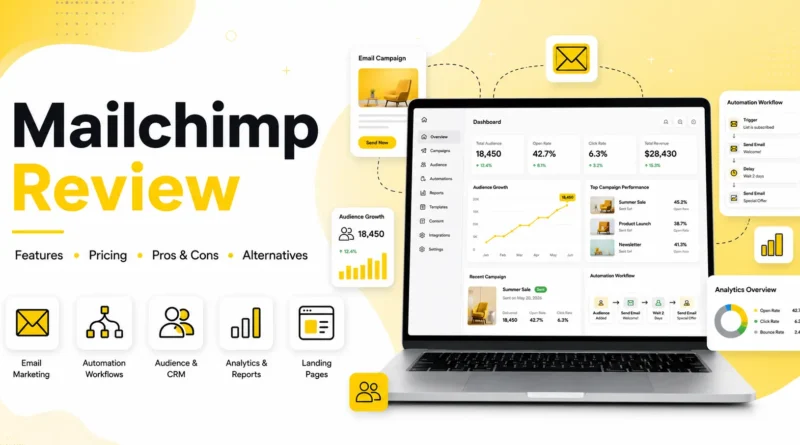
Mailchimp Review 2026: Best Email Marketing Tool?
Email marketing remains one of the highest-ROI digital marketing channels, and choosing the right platform can significantly impact your business growth. Among the many options available, Mailchimp has established itself as one of the most recognizable names in email marketing and customer engagement.
Originally launched as an email marketing tool, Mailchimp has evolved into a comprehensive marketing platform offering automation, CRM capabilities, landing pages, SMS marketing (in supported regions), website building, and AI-powered marketing tools. But with increasing competition from platforms like Brevo, ActiveCampaign, MailerLite, and ConvertKit, many businesses wonder whether Mailchimp is still the best choice.
In this detailed Mailchimp review, we’ll examine its features, pricing, ease of use, strengths, weaknesses, and overall value to help you decide whether it’s the right platform for your business.
What is Mailchimp?
Mailchimp is an all-in-one marketing platform designed to help businesses grow through email marketing, customer relationship management (CRM), marketing automation, websites, and digital advertising.
While many people still think of Mailchimp as simply an email newsletter service, it now offers tools for managing customer relationships, building sales funnels, creating landing pages, automating marketing campaigns, collecting leads, and analyzing campaign performance from one dashboard.
Whether you’re running an online store, a small business, a blog, or a growing startup, Mailchimp provides the tools needed to communicate with customers throughout their buying journey.
Key Information
| Feature | Details |
|---|---|
| Software Type | Customer Engagement & Email Marketing Platform |
| Best For | Small Businesses, Startups, Ecommerce Stores, Creators, Agencies |
| Email Marketing | ✔️ |
| Marketing Automation | ✔️ |
| CRM | ✔️ |
| SMS Marketing | ✔️ (Supported Regions) |
| Landing Pages | ✔️ |
| Website Builder | ✔️ |
| Signup Forms & Pop-ups | ✔️ |
| Customer Journey Builder | ✔️ |
| A/B Testing | ✔️ |
| AI Content Tools | ✔️ |
| Analytics & Reporting | ✔️ |
| 300+ Integrations | ✔️ |
| API Access | ✔️ |
| Free Plan | Available |
| Starting Price | Paid plans start from $13/month* |
Pros and Cons
Pros
- Beginner-friendly interface
- Excellent drag-and-drop email builder
- Large library of professionally designed templates
- Powerful customer journey automation
- Built-in CRM and audience management
- Landing pages and website builder included
- Hundreds of third-party integrations
- AI tools for content generation and optimization
- Reliable email deliverability
- Generous free plan for beginners
Cons
- Pricing increases quickly as your contact list grows
- Advanced automation is limited on lower plans
- Some features require Premium plans
- SMS marketing is only available in selected countries
- Support options depend on your subscription tier
Why Mailchimp?
Ease of Use
One of Mailchimp’s biggest strengths is its user-friendly interface.
The dashboard is clean, intuitive, and well-organized, making it suitable even for users with no previous email marketing experience.
Creating a campaign typically involves four simple steps:
- Choose a campaign type
- Design your email
- Select your audience
- Schedule or send
The drag-and-drop editor allows users to customize layouts without writing any code. Images, buttons, videos, product blocks, and social icons can be added with just a few clicks.
Overall, Mailchimp is one of the easiest to understand among the list of top email marketing platforms.
Ease of Use Rating: 5/5
Email Marketing Features
Email marketing remains Mailchimp’s core strength.
Users can create:
- Promotional campaigns
- Newsletters
- Welcome emails
- Product announcements
- Holiday campaigns
- Transactional emails
- RSS campaigns
- Event invitations
The platform includes hundreds of customizable templates that work across desktop and mobile devices.
Users can also save custom templates for future campaigns.
Marketing Automation
Automation helps businesses save time while delivering personalized customer experiences.
Mailchimp’s Customer Journey Builder enables businesses to automate:
- Welcome series
- Abandoned cart emails
- Birthday emails
- Product recommendations
- Customer win-back campaigns
- Purchase follow-ups
- Lead nurturing sequences
Users can create automation workflows using visual drag-and-drop tools instead of complicated coding.
Advanced users can build multi-step customer journeys based on:
- Purchases
- Website activity
- Tags
- Audience segments
- Email engagement
- Custom events
Audience Management & CRM
Mailchimp includes a lightweight CRM that helps businesses organize contacts and understand customer behavior.
Key CRM features include:
- Audience segmentation
- Contact profiles
- Purchase history
- Tags
- Customer lifetime value
- Behavioral targeting
- Predictive demographics
Instead of maintaining multiple spreadsheets, businesses can manage customer data directly inside Mailchimp.
Landing Pages & Website Builder
Mailchimp allows users to create landing pages without purchasing separate software.
Landing pages can be used for:
- Lead generation
- Webinar registrations
- Product launches
- Event signups
- Newsletter subscriptions
Users can also build simple business websites using Mailchimp’s website builder.
Although it isn’t as advanced as WordPress or Webflow, it’s sufficient for many small businesses and startups.
AI Features
Mailchimp has incorporated artificial intelligence into several parts of its platform.
AI tools assist with:
- Email copy suggestions
- Subject line recommendations
- Content optimization
- Send-time optimization
- Product recommendations
- Marketing insights
These features can improve campaign performance while reducing the time required to create content.
Analytics & Reporting
Mailchimp provides detailed reports after every campaign.
Important metrics include:
- Open rate
- Click rate
- Bounce rate
- Unsubscribe rate
- Revenue tracking
- Ecommerce performance
- Audience growth
- Geographic data
- Device reports
Reports are presented in an easy-to-understand dashboard suitable for both beginners and experienced marketers.
MailChimp Integration
Mailchimp integrates with hundreds of popular business applications.
Popular integrations include:
- Shopify
- WooCommerce
- WordPress
- Canva
- Salesforce
- Zapier
- Google Analytics
- Stripe
These integrations make it easier to synchronize customer data across multiple platforms.
Pricing
Mailchimp offers several pricing tiers to accommodate businesses of different sizes.
Free Plan
Ideal for beginners and small audiences.
Includes:
- Basic email marketing
- Signup forms
- Landing pages
- Limited automation
- Basic reporting
Essentials
Suitable for growing businesses needing additional templates, A/B testing, and customer support.
Standard
Adds advanced automation, customer journeys, behavioral targeting, and enhanced reporting.
Premium
Designed for larger organizations requiring advanced segmentation, multivariate testing, and enterprise-level features.
One important consideration is that Mailchimp’s pricing increases as your contact list grows, making it more expensive than some competitors for large audiences.
Customer Support
Support options vary depending on your subscription.
Available resources include:
- Knowledge base
- Tutorials
- Marketing guides
- Email support
- Live chat (paid plans)
- Community forums
Mailchimp also provides onboarding resources and educational content for beginners.
Security
Mailchimp includes several security features designed to protect customer data.
These include:
- Two-factor authentication
- Data encryption
- GDPR tools
- Permission management
- Secure infrastructure
Businesses handling customer information can also configure compliance settings for privacy regulations.
Mailchimp vs Competitors
| Feature | Mailchimp | Brevo | ActiveCampaign | MailerLite |
|---|---|---|---|---|
| Email Marketing | ⭐⭐⭐⭐⭐ | ⭐⭐⭐⭐⭐ | ⭐⭐⭐⭐⭐ | ⭐⭐⭐⭐☆ |
| Automation | ⭐⭐⭐⭐☆ | ⭐⭐⭐⭐☆ | ⭐⭐⭐⭐⭐ | ⭐⭐⭐⭐☆ |
| CRM | ✔️ | ✔️ | ✔️ | Limited |
| Landing Pages | ✔️ | ✔️ | ✔️ | ✔️ |
| SMS Marketing | ✔️ | ✔️ | Limited | No |
| Ease of Use | ⭐⭐⭐⭐⭐ | ⭐⭐⭐⭐☆ | ⭐⭐⭐⭐☆ | ⭐⭐⭐⭐⭐ |
| Free Plan | ✔️ | ✔️ | Limited | ✔️ |
| Best For | Beginners & Growing Businesses | Budget-Conscious Businesses | Advanced Marketing Teams | Creators & Small Businesses |
Who Should Use Mailchimp?
Mailchimp is an excellent choice for:
- Small businesses
- Ecommerce stores
- Startups
- Bloggers
- Freelancers
- Agencies
- Nonprofits
- Content creators
It is particularly well-suited for businesses looking for an all-in-one platform that combines email marketing, automation, CRM, and customer engagement tools without requiring advanced technical knowledge.
Who Should Look Elsewhere?
Mailchimp may not be the best option if:
- You have a very large contact list and need lower pricing.
- You require enterprise-level automation on a limited budget.
- You need advanced CRM capabilities beyond marketing.
- You want unlimited automation features at lower subscription levels.
Platforms like Brevo, ActiveCampaign, or MailerLite may offer better value depending on your specific requirements.
Final Verdict
Mailchimp continues to be one of the strongest all-around email marketing and customer engagement platforms available. Its intuitive interface, extensive feature set, reliable automation, and wide range of integrations make it an excellent option for beginners and growing businesses alike.
While its pricing can become expensive as your subscriber base expands, the platform compensates with powerful marketing tools, AI-assisted features, and a polished user experience. If you’re looking for a solution that combines email marketing, CRM, automation, landing pages, and analytics in one place, Mailchimp remains a compelling choice.
Overall Rating: 4.6/5
Recommended for: Small businesses, startups, ecommerce stores, creators, agencies, and organizations seeking an easy-to-use yet scalable marketing platform.