DDR3 vs DDR4 vs DDR5 RAM: Which Should You Choose?
When you buy or upgrade a computer, one of the most confusing choices is between DDR3, DDR4, and DDR5 RAM.
Each new generation promises faster performance, better efficiency, and improved multitasking – but what do these terms really mean?
Let’s break it down in simple words so you can easily decide which RAM type suits your needs.
What is DDR RAM?
DDR stands for Double Data Rate.
It’s a type of memory used in computers and laptops that transfers data twice in one clock cycle — making it faster than older memory technologies.
Over the years, DDR memory has evolved through several generations:
-
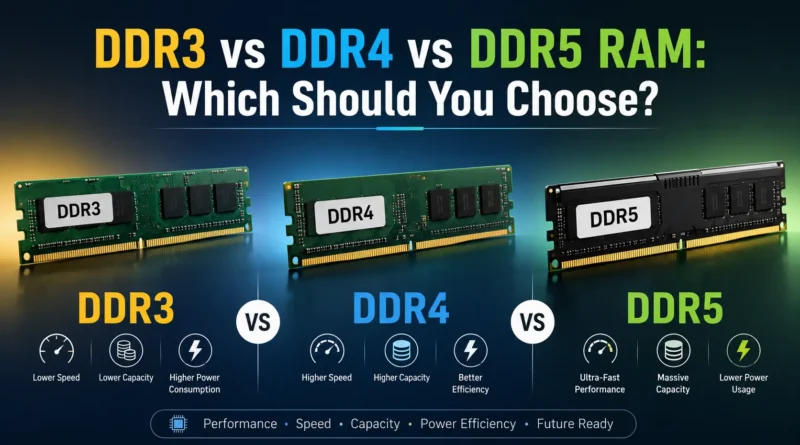
DDR3 (older, still found in many budget PCs)
-
DDR4 (common and affordable in modern systems)
-
DDR5 (latest, fastest, and ideal for high-end setups)
DDR3 vs DDR4 vs DDR5: Quick Comparison Table
| Feature | DDR3 | DDR4 | DDR5 |
|---|---|---|---|
| Release Year | 2007 | 2014 | 2020 |
| Speed Range (MHz) | 800 – 2133 | 2133 – 3200+ | 4800 – 8400+ |
| Voltage | 1.5V | 1.2V | 1.1V |
| Bandwidth | Up to 17 GB/s | Up to 25.6 GB/s | Up to 51.2 GB/s |
| Power Efficiency | Moderate | Better | Best |
| Capacity per Module | Up to 8GB | Up to 32GB | Up to 128GB |
| Ideal For | Basic users, older PCs | Most users, gaming, work | Power users, AI, and future-ready systems |
Understanding Each Type of DDR RAM
DDR3 RAM (Older, Budget-Friendly Option)
DDR3 is an older generation of RAM used in computers built before 2016.
It still works fine for basic tasks like browsing, watching videos, or office work – but it’s not ideal for modern gaming or multitasking.
Pros:
-
Affordable
-
Works well for older systems
Cons:
-
Slower speed
-
Higher power use
-
Not supported by new motherboards
Best For: Old PCs or laptops you still use for light tasks.
🔵 DDR4 RAM (Most Common and Reliable Choice)
DDR4 is currently the most popular RAM type used in most desktops and laptops.
It’s much faster and more energy-efficient than DDR3, making it great for gaming, video editing, and professional work.
Pros:
-
Good balance of speed and cost
-
Widely available
-
Better multitasking performance
Cons:
-
Not as fast as DDR5
-
Slightly higher latency than newer RAM
Best For: Regular users, gamers, and professionals who want reliable performance without spending too much.
DDR5 RAM (Latest and Fastest)
DDR5 is the newest generation of memory launched around 2020.
It offers double the speed of DDR4, higher capacity, and improved power efficiency.
If you’re building a future-proof PC, DDR5 is the best option – though it’s more expensive right now.
Pros:
-
Extremely fast
-
Handles heavy tasks like AI, 3D rendering, and gaming
-
More energy-efficient
Cons:
-
Costly
-
Needs a DDR5-compatible motherboard
-
Limited performance difference in basic tasks
Best For: High-end gamers, creators, and users planning long-term builds.
Performance Comparison in Real Use
| Task | DDR3 | DDR4 | DDR5 |
|---|---|---|---|
| Web Browsing & Office Work | Smooth | Very Smooth | Same as DDR4 |
| Gaming (1080p / 1440p) | Moderate FPS | High FPS | Slightly higher FPS |
| Video Editing & Rendering | Slower | Fast | Very Fast |
| AI / 3D Applications | Not Suitable | Good | Excellent |
| Power Use (Laptop Battery) | Drains faster | Efficient | Most efficient |
Key Insight:
For daily use, DDR4 still delivers the best value.
DDR5 shows major benefits only in heavy multitasking, AI processing, or next-gen gaming.
Compatibility Tip
Each DDR version works only with its matching motherboard socket.
That means:
-
You can’t install DDR5 RAM on a DDR4 motherboard.
-
Always check your motherboard model before upgrading.
Pro Tip:
If you have DDR3, upgrading directly to DDR4 or DDR5 usually requires a new motherboard and CPU.
Price and Value (as of 2025)
| RAM Type | Approx. Price (per 16GB module) | Value for Money |
|---|---|---|
| DDR3 | ₹2,000 – ₹3,000 | Budget option only |
| DDR4 | ₹3,500 – ₹5,500 | Best balance |
| DDR5 | ₹6,000 – ₹10,000+ | Premium, future-ready |
Prices vary depending on brand, speed (MHz), and system compatibility.
Final Verdict: Which RAM Should You Choose?
Here’s a simple answer:
-
Choose DDR3 – Only if you’re upgrading an old computer.
-
Choose DDR4 – Best for most users, gamers, and professionals in 2025.
-
Choose DDR5 – Ideal for future-proof builds, AI work, or next-gen gaming PCs.
If you’re buying a new PC, DDR5 is worth it for long-term performance.
But if you’re on a budget or using a mid-range system, DDR4 still offers the best overall value.
Summary Table
| Feature | DDR3 | DDR4 | DDR5 |
|---|---|---|---|
| Speed | Slow | Fast | Very Fast |
| Power Efficiency | Low | Good | Excellent |
| Cost | Cheapest | Affordable | Expensive |
| Best For | Old PCs | Most users | Future builds |
| Recommendation (2025) | ❌ Avoid for new builds | ✅ Best value | 🌟 Future-ready |
Expert Tip
If your main goal is to boost speed, also check your storage drive.
Pairing SSD storage with DDR4 or DDR5 RAM gives the best overall performance improvement.