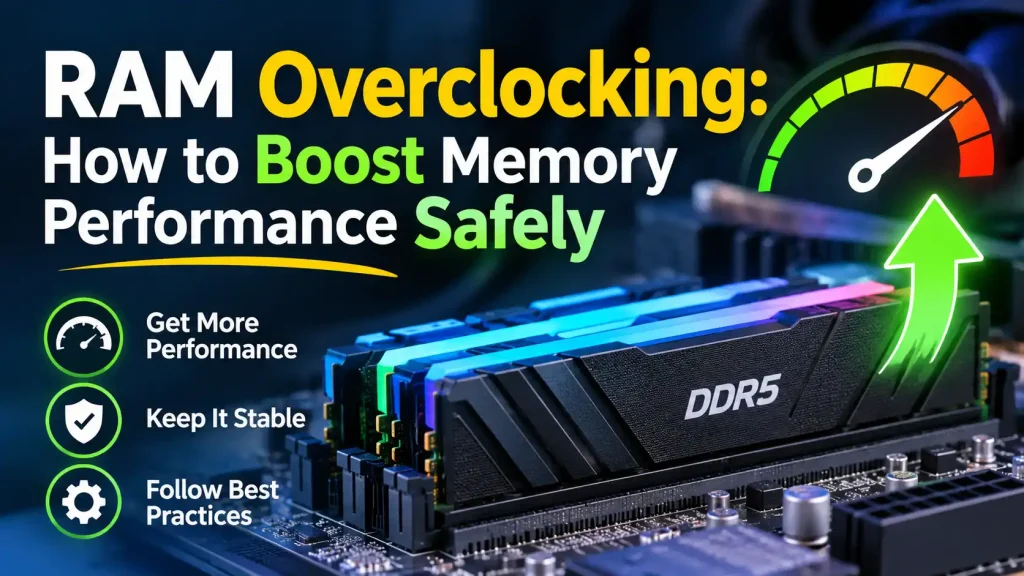
RAM Overclocking: How to Boost Memory Performance Safely
RAM overclocking means running memory at a higher frequency, tighter timings, or both, compared with the default JEDEC speed set by the manufacturer. The easiest method is enabling XMP (Intel) or EXPO (AMD) in the BIOS, which applies the speed the kit was sold at. Manual tuning can add more, but it needs careful voltage control and long stability testing.
Search intent here is informational and how-to. Readers want to know what memory overclocking is, whether it is worth doing, and how to do it without damaging hardware or corrupting data. This guide covers desktops first, with notes on laptops.
What Is RAM Overclocking?
Random access memory is the short-term storage the CPU reads and writes while running programs. Its speed depends on three settings.
The Three Settings That Matter
- Frequency (data rate): measured in MT/s, such as DDR4-3200 or DDR5-6000. Higher means more data moved per second.
- Timings: a series of numbers like CL16-18-18-38. Each is a delay in clock cycles. Lower is faster.
- Voltage: the power supplied to the modules. Higher voltage can stabilize higher speeds but adds heat and wear.
Most kits ship with a safe JEDEC profile. DDR4 defaults commonly sit at 2133 to 3200 MT/s, and DDR5 starts at 4800 MT/s. A kit sold as DDR5-6000 runs at 4800 until an XMP or EXPO profile is switched on, which is why many systems run slower than the box says.
For a refresher on how memory works, see this guide to random access memory. Differences between generations are covered in DDR3 vs DDR4 vs DDR5.
Does RAM Overclocking Improve Performance?
It does, but the gain depends on the workload. Memory speed rarely changes everyday browsing or office work. It matters more where the CPU waits on memory.
| Workload | Typical benefit from faster RAM | Notes |
|---|---|---|
| Integrated graphics gaming | High | iGPUs use system RAM as video memory, so bandwidth directly limits frame rate |
| CPU limited gaming | Moderate | Improvements show mostly in 1% low frame rates, not average FPS |
| Video editing, 3D rendering | Low to moderate | Depends on the application and core count |
| Compression, simulation, compiling | Moderate | Memory heavy tasks scale with bandwidth |
| Web browsing, office use | Very low | Capacity matters more than speed |
Independent reviewers such as Hardware Unboxed and Gamers Nexus have published memory scaling tests across several CPU generations, and the pattern holds: the biggest gains come from fixing a slow default setup, not from pushing an already fast kit.
Capacity often matters more than speed. Before overclocking, check whether the system has enough memory by reading how much RAM is really needed. A related read on the same question is whether RAM speed makes a computer faster.
Check These Before Starting
- Motherboard support: Budget boards (Intel H-series, AMD A-series) often limit memory tuning. Intel B and Z boards and AMD B and X boards allow more control.
- CPU memory controller: Every CPU has a ceiling. A kit rated above that ceiling may not run at its label speed.
- BIOS version: Newer BIOS releases often improve memory compatibility.
- Kit type: Matched kits of two modules are more reliable than mixing four sticks of different kits.
- Backups: An unstable memory setting can corrupt files. Follow data backup and recovery practices first.
- Cooling: Heat reduces memory stability. Dust and weak airflow make it worse, so review how to keep hardware cool and clean.
Speed and Latency: The Number Most Guides Skip
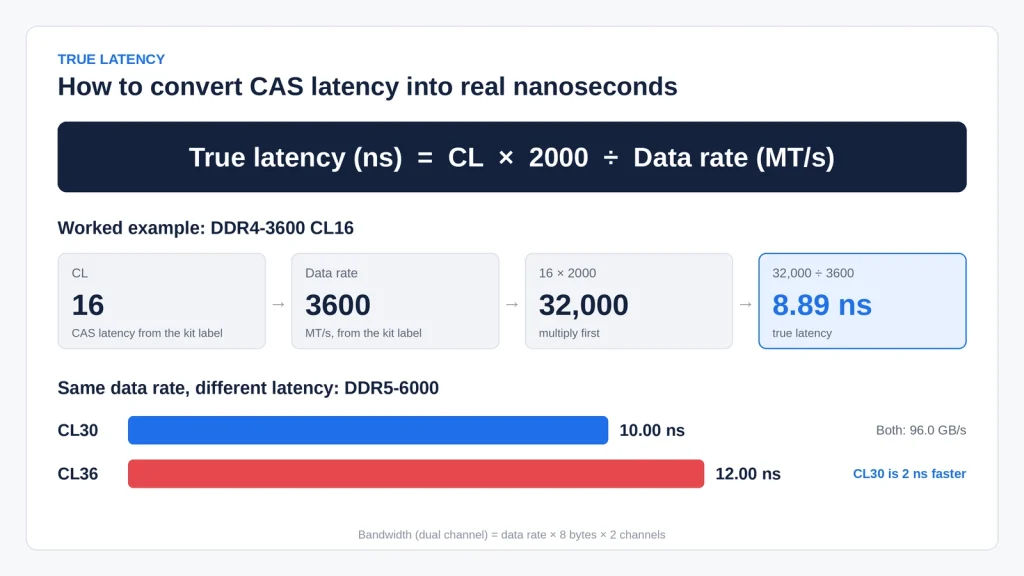
Frequency alone is misleading. The real delay of a memory kit in nanoseconds is called true latency.
True latency (ns) = CL × 2000 ÷ data rate (MT/s)
| Kit | CAS Latency | Data Rate | True Latency | Dual Channel Bandwidth |
|---|---|---|---|---|
| DDR4-3200 | CL16 | 3200 MT/s | 10.00 ns | 51.2 GB/s |
| DDR4-3600 | CL16 | 3600 MT/s | 8.89 ns | 57.6 GB/s |
| DDR5-4800 | CL40 | 4800 MT/s | 16.67 ns | 76.8 GB/s |
| DDR5-6000 | CL30 | 6000 MT/s | 10.00 ns | 96.0 GB/s |
| DDR5-6000 | CL36 | 6000 MT/s | 12.00 ns | 96.0 GB/s |
Bandwidth is calculated as data rate × 8 bytes × number of channels. Two practical points follow from the table:
- A DDR5-6000 CL36 kit and a DDR5-6000 CL30 kit have the same bandwidth, but the CL30 kit responds 2 ns faster.
- Moving from DDR4-3200 CL16 to DDR4-3600 CL16 improves both bandwidth (12.5%) and latency (about 11%) at the same time. This is why 3600 CL16 became the common DDR4 target.
RAM Overclocking Methods Compared
| Method | Difficulty | Gain | Risk | Best for |
|---|---|---|---|---|
| XMP or EXPO profile | Easy | Medium | Low | Most users |
| Manual frequency increase | Medium | Medium to high | Medium | Enthusiasts with a stable XMP base |
| Manual timing tuning | Hard | Medium (mainly latency) | Medium | Experienced tuners |
| Voltage increase | Hard | Enables higher speed | Higher | Only with testing and cooling |
| Preset timing calculators (Ryzen DRAM Calculator) | Medium | Medium | Medium | AMD DDR4 users |
How to Overclock RAM: Step by Step
Step 1: Record the Baseline
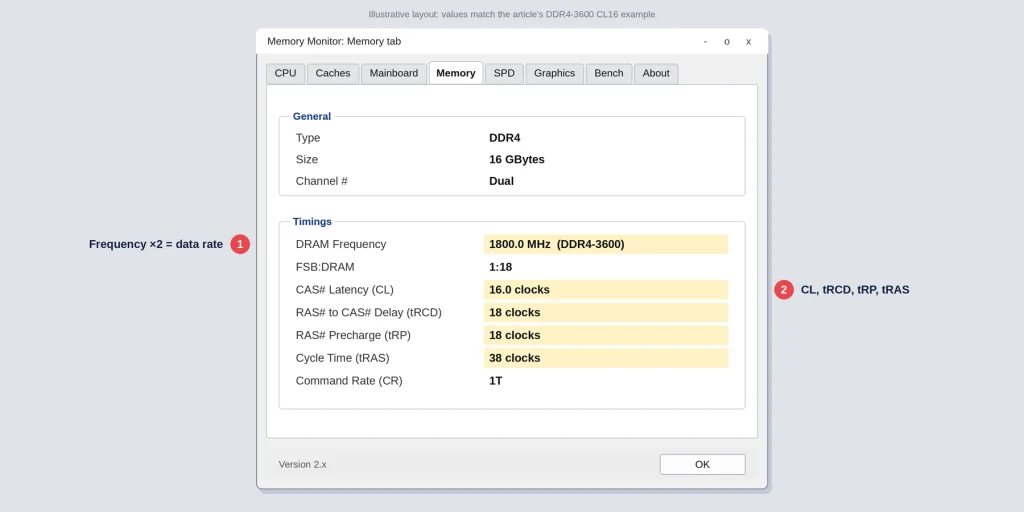
Open CPU-Z and read the Memory and SPD tabs. Note the current frequency, timings, and the kit’s rated profile. Run a baseline benchmark such as AIDA64 Cache and Memory or the memory test in Cinebench or 7-Zip and save the results. Without a baseline there is no way to confirm a real improvement.
Step 2: Update the BIOS
Check the motherboard maker’s support page for the latest stable BIOS and read the release notes for memory compatibility changes. Update only if the release notes mention memory support or if the board has known issues. Do not interrupt a BIOS update, because a power cut can brick the board.
Step 3: Enable XMP or EXPO
Enter the BIOS (usually Delete or F2 at startup) and find the memory profile option. Names vary:
- Intel: XMP, Extreme Memory Profile
- AMD: EXPO, DOCP, or A-XMP depending on the board
Select Profile 1, save, and restart. DDR5 systems may take one to several minutes on the first boot while memory training runs. A black screen in that window is normal. Wait before resetting.
Step 4: Test Stability
Booting into Windows does not prove stability. Run a proper memory test:
- Run TestMem5 (TM5) with a community config such as anta777 for 1 to 2 hours.
- Or run Karhu RAM Test until the coverage reaches at least 6000 to 10000 percent.
- Or run MemTest86 from a USB drive for at least four passes.
One error means the setting is unstable. Do not ignore a single error. Silent memory errors can cause corrupted files and random crashes weeks later.
Step 5: Raise the Frequency Manually
If XMP is stable and more speed is wanted, increase the data rate one step at a time (for example 3600 to 3733 on DDR4, or 6000 to 6200 on DDR5). Leave timings loose when raising frequency, then test again. If errors appear, add a small amount of voltage or return to the last stable step.
On AMD Ryzen, the memory controller and Infinity Fabric run in a fixed ratio at lower speeds. Past a certain point the ratio changes to 2:1, and latency rises sharply. For Ryzen 5000 on DDR4, the practical limit is usually around DDR4-3600 to 3800 with FCLK at half the data rate. For Ryzen 7000 on DDR5, AMD has pointed to DDR5-6000 as the sweet spot for the 1:1 ratio.
Step 6: Tighten Timings
Reduce the primary timings (CL, tRCD, tRP, tRAS) by one or two steps at a time. Secondary timings such as tRFC often give strong gains, because default values are very loose. Change one timing group, run a short test, then run a long test before moving on.
Step 7: Adjust Voltage Only If Needed
Increase voltage in small steps (0.01 V to 0.02 V). Watch temperatures, and stop at the limits in the next section.
Commonly Cited Voltage Ranges
Limits vary by memory chip type and board. Treat these as general community guidance, and follow the kit maker’s specification first.
| Memory type | Stock voltage | Commonly accepted daily range | Notes |
|---|---|---|---|
| DDR4 | 1.20 V | Up to about 1.40 to 1.45 V | Higher needs strong airflow |
| DDR5 (VDD, VDDQ) | 1.10 V | Up to about 1.35 to 1.40 V | Power management sits on the module, so heat builds quickly |
| CPU memory controller voltage | Varies | Follow CPU maker guidance | Excess voltage can degrade the CPU over time |
Raising voltage without cooling is the most common cause of early module failure.
Intel vs AMD: Platform Notes
| Point | Intel | AMD Ryzen |
|---|---|---|
| Profile name | XMP | EXPO (DOCP on some boards) |
| Gear or ratio setting | Gear 1 or Gear 2 modes affect latency | FCLK and UCLK ratio affect latency |
| Common sweet spot | Board and CPU dependent | DDR4-3600 CL16 (Ryzen 5000), DDR5-6000 (Ryzen 7000) |
| Tuning tools | Intel XTU, BIOS | Ryzen DRAM Calculator, BIOS |
| Overclocking restrictions | Memory overclocking is mostly limited to Z series boards on older generations | Most chipsets allow it |
Stability Testing Tools
| Tool | Type | Strength | Limit |
|---|---|---|---|
| MemTest86 | Bootable | Tests without an operating system | Slow to find some errors |
| TestMem5 (TM5) | Windows | Finds errors quickly with custom configs | Needs a config file |
| Karhu RAM Test | Windows, paid | Reports coverage, fast error detection | Paid license |
| OCCT | Windows | Combines memory and CPU stress | Less specific to memory |
| Prime95 (blend) | Windows | Heavy CPU and memory load | Can fail from CPU settings, not memory |
Use two different tools. A setting that passes one test can fail another.
Common RAM Overclocking Problems and Fixes
- No boot or black screen: Wait several minutes for memory training. If nothing happens, clear CMOS using the jumper or battery.
- Boots but only half the memory appears: Reseat the modules and check the slot pairing in the manual (usually slots 2 and 4 for two sticks).
- Random crashes or a blue screen error: Memory errors are a known cause. Lower the frequency, loosen timings, or revert to the default profile and test again.
- Application crashes only under load: Run a long test. Short tests miss errors that appear after an hour or more.
- High temperatures: Add airflow over the modules or lower the voltage.
Memory instability can look like a software issue. Before concluding that, check general fixes in the guide to speeding up a slow laptop and the list of laptop optimization tools.
Worked Example: DDR4-3200 to DDR4-3600
Take a Ryzen 5 5600 system with a 2 × 8 GB kit running at JEDEC speed.
- Stock: DDR4-2666 CL19, true latency = 19 × 2000 ÷ 2666 = 14.26 ns, dual channel bandwidth = 42.7 GB/s.
- After enabling the XMP/DOCP profile of DDR4-3600 CL18: true latency = 10.00 ns, bandwidth = 57.6 GB/s.
- After tightening to CL16 with a small voltage bump and stability testing: true latency = 8.89 ns.
That is a 38% drop in true latency and a 35% rise in bandwidth, achieved mostly by switching on the rated profile. These figures come from calculation, not a benchmark, so real application gains will be smaller and vary by workload.
Laptop RAM Overclocking
Most laptops do not allow memory overclocking because BIOS menus are locked and memory is often soldered. Some gaming laptops expose an XMP option for SO-DIMM modules. For other laptops, the better gains come from adding capacity or moving to a faster drive. For that comparison, read SSD vs RAM for a faster laptop and the guide to upgrading RAM in a laptop or desktop.
Frequently Asked Questions
Is RAM overclocking safe?
Yes, when voltage stays within the kit and CPU maker’s limits and temperatures are controlled. Enabling XMP or EXPO is considered safe because the profile is set by the memory maker. Risk rises with manual voltage increases and poor cooling.
How much performance does RAM overclocking give?
Gains vary by workload. Integrated graphics and CPU limited games benefit most, mainly in 1% low frame rates. Office tasks and browsing show little change.
Is XMP the same as overclocking?
Technically yes, because XMP runs memory beyond the JEDEC standard. In practice it is a tested factory profile, so it is the safest form of overclocking.
Does overclocking RAM void the warranty?
XMP and EXPO profiles are normally covered by the memory maker’s warranty. Manual voltage changes may not be, so check the warranty terms of the kit and the CPU before changing them.
How do I know if my RAM overclock is stable?
Run a memory test such as TestMem5, Karhu, or MemTest86 for several hours with zero errors. Then use the system normally for a few days and watch for crashes or file corruption.
Does RAM overclocking shorten RAM lifespan?
Modest changes within safe voltage limits rarely cause problems. High voltage combined with high temperature speeds up wear and can cause early failure.