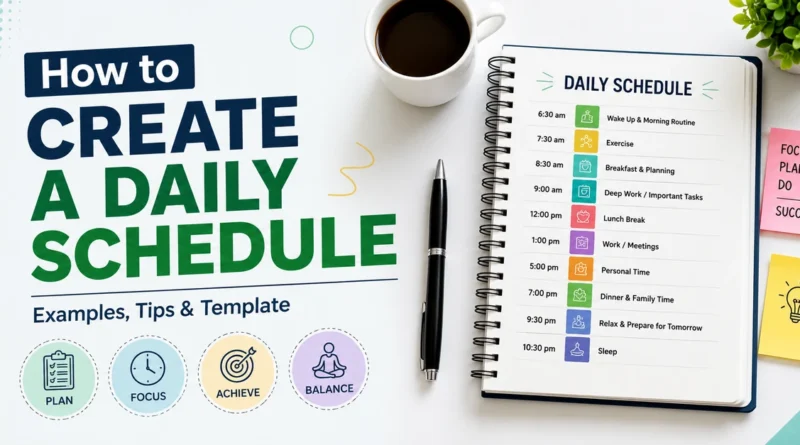
How to Create a Daily Schedule: Examples, Tips & Template
A daily schedule is a simple plan that tells you what to do and when to do it. It helps you use your time better, avoid last minute rush, and finish important tasks without stress. Many people feel busy all day but still do not finish their real work. A good schedule fixes this problem.
In this article, you will learn what a daily schedule is, why it matters, how to build one step by step, and you will also get a free template you can copy and start your schedule from now. Real examples and simple tips are included so anyone can start right away, even beginners.
What Is a Daily Schedule?
A daily schedule is a written plan of your day. It lists tasks along with the time you plan to do them. Unlike a simple to do list, a schedule gives each task a fixed time slot. A daily schedule that uses proper time management makes it easier to follow because you always know what comes next.
For example, instead of writing “finish report” on a to do list, a schedule shows “finish report from 10:00 AM to 11:30 AM.” This small change makes a big difference in how well the plan works.
Why a Daily Schedule Matters
A clear schedule brings many benefits. Here are the main ones.
Saves time: When you know your plan in advance, you do not waste time deciding what to do next.
Reduces stress: A schedule gives you a sense of control over your day. You feel calmer because you know your tasks are organized.
Improves focus: When each task has its own time block, you are less likely to get distracted by other things.
Helps you finish important work first: A schedule pushes you to place your most important tasks early in the day, when your energy is highest.
Builds good habits: Following a schedule daily trains your brain to work in a routine, which makes future planning easier.
How to Create a Daily Schedule Step by Step
Building a daily schedule does not need to be complicated. Follow these steps.
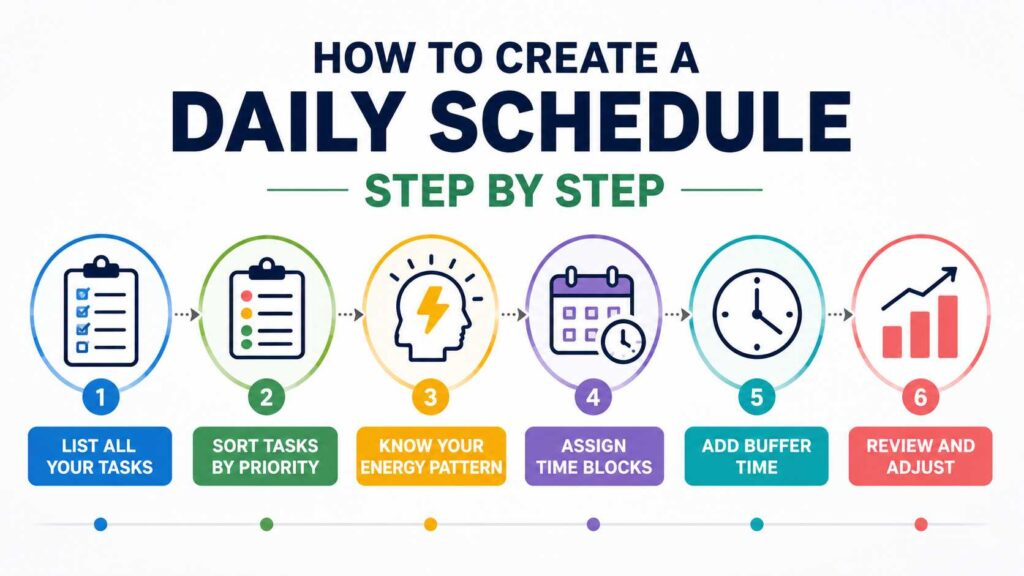
Step 1: List All Your Tasks
Start by writing down everything you need to do. Include work tasks, personal tasks, and small errands. Do not filter anything at this stage. Just get everything out of your head and onto paper.
Example list:
- Reply to emails
- Team meeting
- Write blog post
- Grocery shopping
- Gym session
- Cook dinner
Step 2: Sort Tasks by Priority
Not all tasks are equally important. Use a simple method like High, Medium, Low priority to sort your list. This helps you decide what needs your best energy and focus.
A popular method here is the Eisenhower Matrix, which sorts tasks into four groups: urgent and important, important but not urgent, urgent but not important, and neither urgent nor important. This method is widely used by productivity experts because it removes confusion about what to do first.
Step 3: Know Your Energy Pattern
Everyone has times of the day when they feel more alert and times when they feel tired. This is called your energy pattern or chronotype. Most people are more focused in the morning, while some work better late at night.
Place your hardest tasks during your high energy hours. Save easy or repetitive tasks like checking emails for your low energy hours.
Step 4: Assign Time Blocks
Now give each task a specific start and end time. This method is called time blocking. It works because it forces you to estimate how long a task really takes, which stops tasks from dragging on all day.
Example:
- 9:00 AM to 9:30 AM: Reply to emails
- 9:30 AM to 11:00 AM: Write blog post
- 11:00 AM to 11:15 AM: Short break
- 11:15 AM to 12:00 PM: Team meeting
Step 5: Add Buffer Time
Do not fill every single minute of your day. Leave small gaps, around 10 to 15 minutes, between tasks. This buffer time absorbs delays and gives you room to breathe. Without buffer time, one late task can ruin your entire schedule.
Step 6: Review and Adjust
At the end of the day, check what worked and what did not. Maybe a task took longer than planned, or maybe you added too many tasks. Use this information to improve tomorrow’s schedule. A schedule is not fixed forever; it should grow with you.
Daily Schedule Examples
Here are real examples for different types of people.
Example 1: Daily Schedule for a Student
| Time | Activity |
|---|---|
| 6:30 AM | Wake up, freshen up |
| 7:00 AM | Breakfast |
| 7:30 AM | Study session 1 (Math) |
| 9:00 AM | School or college |
| 3:00 PM | Lunch and rest |
| 4:00 PM | Study session 2 (Science) |
| 5:30 PM | Sports or exercise |
| 7:00 PM | Dinner |
| 8:00 PM | Homework |
| 9:30 PM | Free time |
| 10:00 PM | Sleep |
Example 2: Daily Schedule for a Working Professional
| Time | Activity |
|---|---|
| 6:00 AM | Wake up, light exercise |
| 7:00 AM | Breakfast |
| 8:00 AM | Commute to work |
| 9:00 AM | Deep work (important task) |
| 11:00 AM | Meetings |
| 1:00 PM | Lunch break |
| 2:00 PM | Emails and admin work |
| 4:00 PM | Project work |
| 6:00 PM | Commute back home |
| 7:00 PM | Dinner with family |
| 8:30 PM | Personal time or hobby |
| 10:30 PM | Sleep |
Example 3: Daily Schedule for a Work From Home Parent
| Time | Activity |
|---|---|
| 6:00 AM | Wake up before kids |
| 6:30 AM | Personal time, coffee |
| 7:00 AM | Get kids ready |
| 8:30 AM | Start work |
| 12:00 PM | Lunch with kids |
| 1:00 PM | Continue work |
| 4:00 PM | Family time |
| 6:00 PM | Cook dinner |
| 7:30 PM | Dinner together |
| 8:30 PM | Kids bedtime routine |
| 9:30 PM | Personal wind down |
| 11:00 PM | Sleep |
These examples show that a good schedule always matches your real life, not someone else’s routine. Copy the structure, but change the timings based on your own responsibilities.
Free Daily Schedule Template
Use this simple template to build your own schedule. Copy it into a notebook, phone app, or spreadsheet.
| Time Slot | Task | Priority (High/Medium/Low) | Done? |
|---|---|---|---|
How to use this template:
- Fill the time slot column first, in blocks of 30 to 60 minutes.
- Add one task per row.
- Mark the priority level for each task.
- Tick the “Done” column once a task is finished.
This format works well on paper, in Google Sheets, or in any note-taking app on your phone.
Tips to Stick to Your Daily Schedule
Planning your day is closely connected to how you manage your time. Simple time management tips, such as prioritizing important tasks and setting realistic limits, can make a schedule easier to follow.
Start small: Do not plan every minute of your day when you are a beginner. Start with 3 to 4 important tasks and grow from there.
Use the two-minute rule: If a task takes less than two minutes, do it right away instead of scheduling it for later.
Batch similar tasks: Group similar activities together, such as answering all emails at once, instead of checking them all day.
Set reminders: Use phone alarms or app notifications to alert you when it is time to switch tasks.
Avoid overplanning: Leave at least one open slot in your day for unexpected tasks or emergencies.
Track your progress weekly: Look back at your week and notice patterns. This helps you plan a more realistic schedule the following week.
Common Mistakes to Avoid
Many people fail at scheduling because of a few common mistakes. Avoid these to build a schedule that actually works.
- Adding too many tasks in one day, which leads to disappointment when they are not finished
- Ignoring energy levels and placing hard tasks at the wrong time
- Skipping breaks, which causes burnout by the afternoon
- Not reviewing the schedule, so the same mistakes repeat daily
- Being too strict, which makes the schedule feel like a punishment instead of a helpful tool
Frequently Asked Questions
What is the best way to create a daily schedule?
The best way is to list your tasks, sort them by priority, assign real time blocks based on your energy levels, and leave buffer time between tasks.
How many hours should a daily schedule cover?
Most schedules cover 12 to 16 hours from wake-up to sleep, including work, personal time, meals, and rest.
What app can I use to make a daily schedule?:
You can use simple tools like Google Calendar, a notebook, or any note taking app. The tool matters less than staying consistent.
Is time blocking better than a to do list?
Time blocking is often more effective because it assigns a fixed time to each task, which reduces procrastination compared to an open ended to do list.
How do I make my schedule realistic?
Track how long tasks actually take for a few days first. Use that real data instead of guessing when you build your schedule.
Final Thoughts
Creating a daily schedule is not about controlling every second of your life. It is about giving your day structure and direction so your time goes toward things that matter. Start with the steps above, use the free template, and adjust it as you learn what works for you. Over time, a simple daily schedule can turn a busy, scattered day into one that feels calm and productive.