How to Manage Multiple Tasks Without Feeling Overwhelmed
To manage multiple tasks, list every task in one place, rank them by urgency and importance, and work on one task at a time in fixed time blocks. Add short breaks and a daily review, and the workload becomes easy to handle.
Many people believe that doing many things at once saves time. Research says the opposite. The American Psychological Association reports that switching between tasks can cost up to 40% of productive time. A study by Gloria Mark at the University of California, Irvine found that it takes about 23 minutes to fully return to a task after an interruption.
The 11 tips below are simple, tested, and work for students, freelancers, office workers, and business owners.
Why Managing Multiple Tasks Feels So Hard
The brain is built to focus on one thing at a time. When many tasks compete for attention, three problems appear:
- Context switching: Each switch drains mental energy.
- Decision fatigue: Too many choices slow down action.
- Unclear priorities: Small tasks get done first, and big tasks wait.
Good task management fixes all three problems.
11 Tips to Manage Multiple Tasks
Here are 11 practical tips to manage multiple tasks, stay organized, and Be Productive Every Day without feeling overwhelmed. Follow these simple strategies to prioritize your work, save time, and stay focused.
1. Write Down Every Task in One Place
Start with a brain dump. Put every task, big or small, into one list. Use a notebook, a phone app, or a digital board like Trello or Notion. Tasks stored only in memory create stress and get forgotten.
Example: A freelance writer lists “send invoice,” “write blog draft,” “reply to client email,” and “book dentist visit” in a single to-do list.
2. Sort Tasks with the Eisenhower Matrix
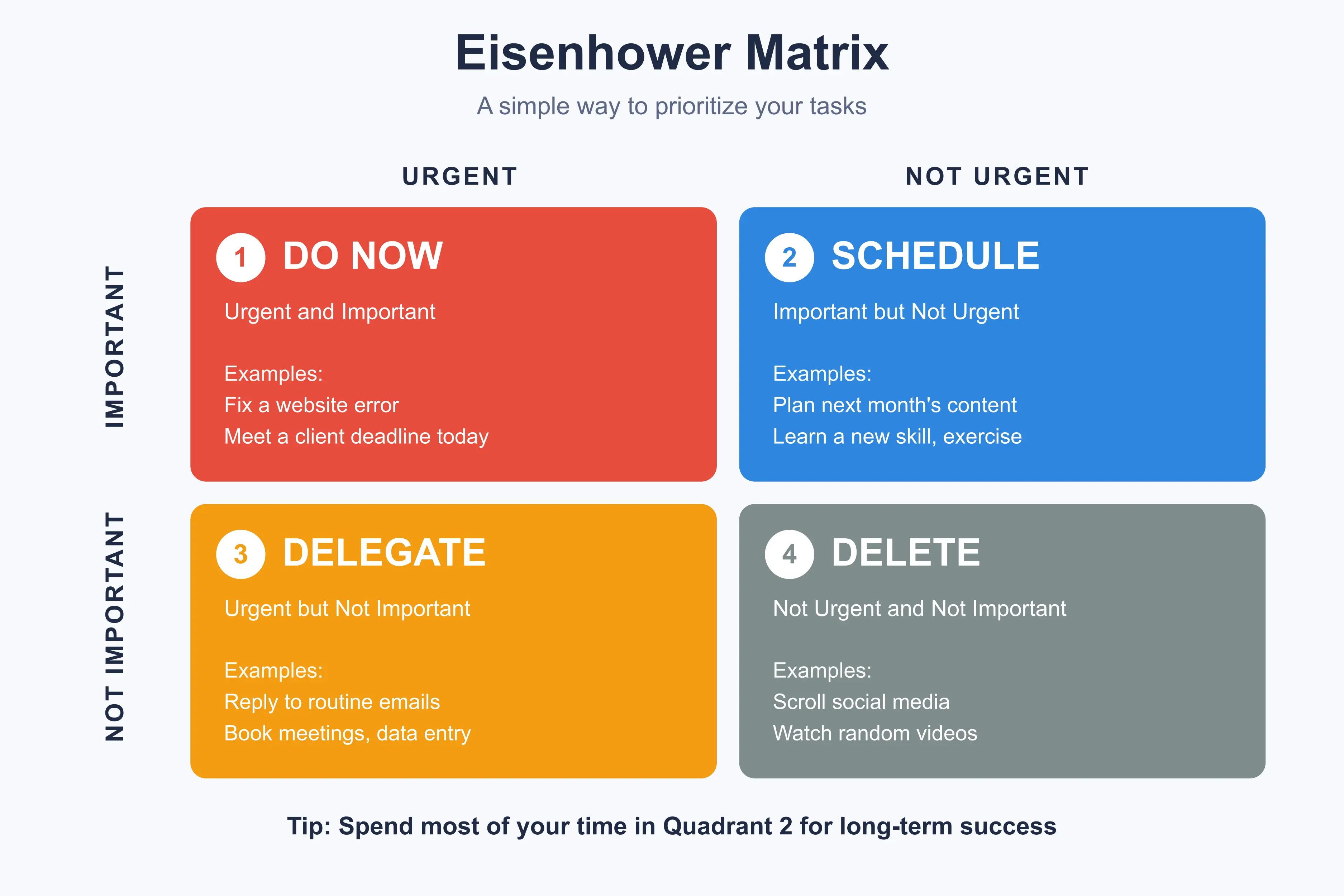
The Eisenhower Matrix is a simple method for task prioritization. It sorts work by urgency and importance.
| Quadrant | Type | Action | Example |
|---|---|---|---|
| 1 | Urgent and Important | Do now | Fix a website error |
| 2 | Not Urgent but Important | Schedule | Plan next month’s content |
| 3 | Urgent but Not Important | Delegate | Reply to routine emails |
| 4 | Not Urgent and Not Important | Delete | Scroll social media |
Most long-term success comes from Quadrant 2, so protect time for it.
3. Pick Your Top 3 Tasks Each Day
A long list can feel heavy. Choose three Most Important Tasks (MITs) every morning. Finish these first. Anything extra is a bonus.
4. Break Big Tasks into Small Steps
A task like “launch website” feels too big to start. Split it into smaller steps:
- Choose a domain name
- Buy hosting
- Install WordPress
- Write the home page
- Test on mobile
Small steps reduce fear and show clear progress.
5. Use Time Blocking
Time blocking means giving each task a fixed slot on the calendar. Instead of asking “what should I do now?”, the calendar already has the answer.
Example: 9:00 to 11:00 AM for writing, 11:00 to 11:30 AM for emails, 2:00 to 3:00 PM for meetings.
Keep a buffer of 15 to 30 minutes between blocks for surprises.
6. Stop Multitasking and Focus on One Task
True multitasking is a myth. The brain only switches fast between tasks, and quality drops each time. A Stanford University study in 2009 found that heavy media multitaskers were worse at filtering out distractions than light multitaskers.
Close extra tabs. Put the phone on silent. Practice deep work, which means long, focused sessions on one important task.
7. Try the Pomodoro Technique
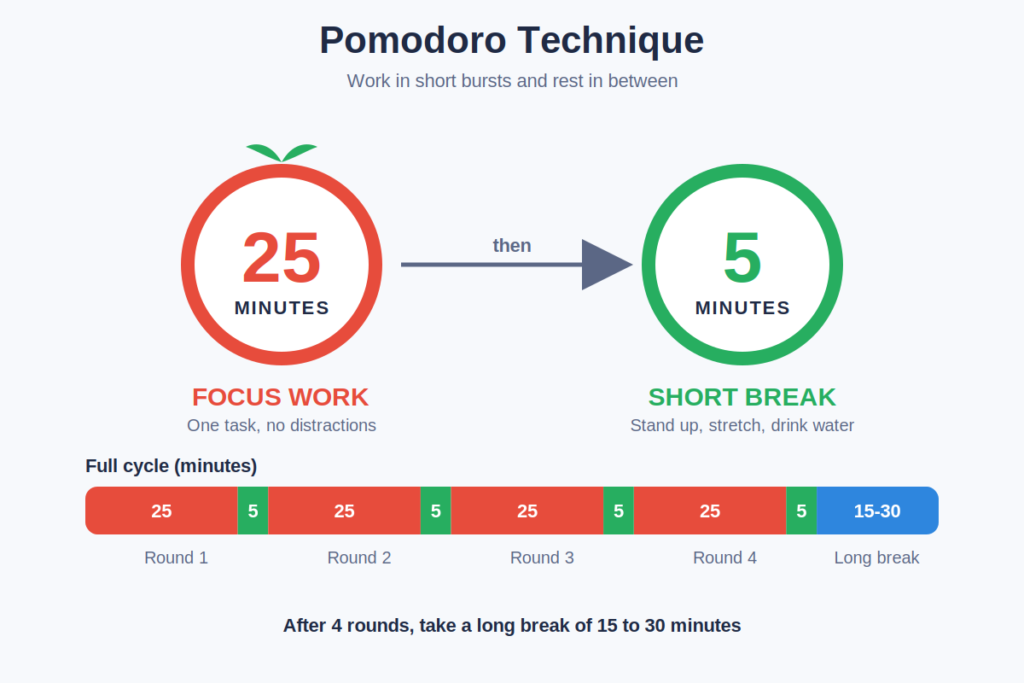
The Pomodoro Technique was created by Francesco Cirillo. It is easy to follow:
- Work for 25 minutes
- Take a 5 minute break
- After four rounds, take a 15 to 30 minute break
This method keeps the mind fresh and makes big tasks feel lighter.
8. Apply the Two-Minute Rule
David Allen, author of Getting Things Done, suggests a simple rule: if a task takes less than two minutes, do it right away. Replying to a short message or filing a document are good examples. This stops small tasks from piling up.
9. Batch Similar Tasks Together
Task batching means grouping similar work and doing it in one session. Answer all emails at once. Make all phone calls together. Write several social posts in one sitting.
This lowers context switching and saves mental energy.
10. Learn to Say No and Delegate
Not every task needs personal attention. Ask these questions:
- Does this task match my main goals?
- Can someone else do it?
- Will it matter in one month?
If the answer is no, delegate it or drop it. A polite “no” protects time for work that matters.
11. Review Daily and Weekly
End each day with a 5-minute review. Check what was done, move unfinished tasks, and set tomorrow’s top three using SMART goals – specific, measurable, achievable, relevant, and time-bound.
Do a longer weekly review every Friday or Sunday. Look at the week ahead, clear old tasks, and adjust your goals. Regular reviews keep your task list organized and help you stay productive.
Quick Daily Routine Example for Managing Multiple Tasks
| Time | Activity |
|---|---|
| 8:30 AM | Review the plan and choose 3 MITs |
| 9:00 AM | Deep work block (Pomodoro) |
| 11:00 AM | Email and message batch |
| 12:30 PM | Lunch and short walk |
| 2:00 PM | Meetings or calls |
| 4:00 PM | Small tasks (two-minute rule) |
| 5:30 PM | Daily review and next day plan |
Common Mistakes to Avoid While Managing Multiple Tasks
- Overplanning: A plan with 20 tasks per day will fail.
- Ignoring breaks: Rest improves focus and output.
- Checking notifications often: Every alert breaks concentration.
- Skipping the review: Without a review, the system slowly falls apart.
- Saying yes to everything: Too many commitments lead to burnout.
Helpful Productivity Tools for Multiple Tasks Work
The right productivity tools make task tracking easier. Popular free options include:
- Google Calendar for time blocking
- Trello for visual task boards
- Todoist for simple to-do lists
- Notion for notes and project planning
- Forest or a basic timer for Pomodoro sessions
Choose one or two tools. Using too many apps becomes another distraction.
Manage Multiple Tasks FAQs
What is the best way to manage multiple tasks at once?
The best way is to prioritize tasks, work on one at a time, and use time blocking. List all tasks, pick the top three, and give each a fixed time slot.
How can I manage multiple tasks without stress?
Break big tasks into small steps, take regular breaks, and avoid taking on extra work. A daily review also reduces stress because the next steps are always clear.
Is multitasking good or bad for productivity?
Multitasking usually lowers productivity. Research shows that task switching wastes time and increases mistakes. Single-tasking gives better quality and speed.
Which method is best for task prioritization?
The Eisenhower Matrix is the most popular method. It separates tasks into do, schedule, delegate, and delete, which makes decisions faster.
How many tasks should be on a daily to-do list?
Keep three to five important tasks per day. A short list is easier to finish and builds good habits.
Conclusion
Managing many tasks is a skill, and it improves with practice. Start with one or two tips, such as the Eisenhower Matrix and time blocking. Add the Pomodoro Technique, task batching, and a weekly review as the habit grows. Small, steady changes lead to better focus, less stress, and more completed work.